You’ve tailored every bullet, kept it to one page, and used action verbs. You hit submit. Then silence. No interview, no rejection—just a black hole.
That feeling—the suspicion that your resume never made it past a robot—isn’t paranoia. According to SHRM‑cited research, a significant share of resumes are filtered before human review (Wobo, Jan 2026). The software that does the filtering is called an applicant tracking system, or ATS.
But here’s the twist: most online advice conflates two separate problems. ATS‑friendly design—does the software read your contact info, job titles, and dates correctly?—is not the same as ATS keyword match—does your content contain the exact phrases the recruiter’s job description uses? You need separate tool features for each, and the best ATS resume builder handles both, but not all do.
This guide covers the top builders, how to test them against the specific ATS your target employer uses, and the one mistake that still trips up experienced job seekers. It does NOT cover general resume writing advice like action verbs or accomplishments—that’s a separate topic.
What Exactly Is an ATS Resume Builder?
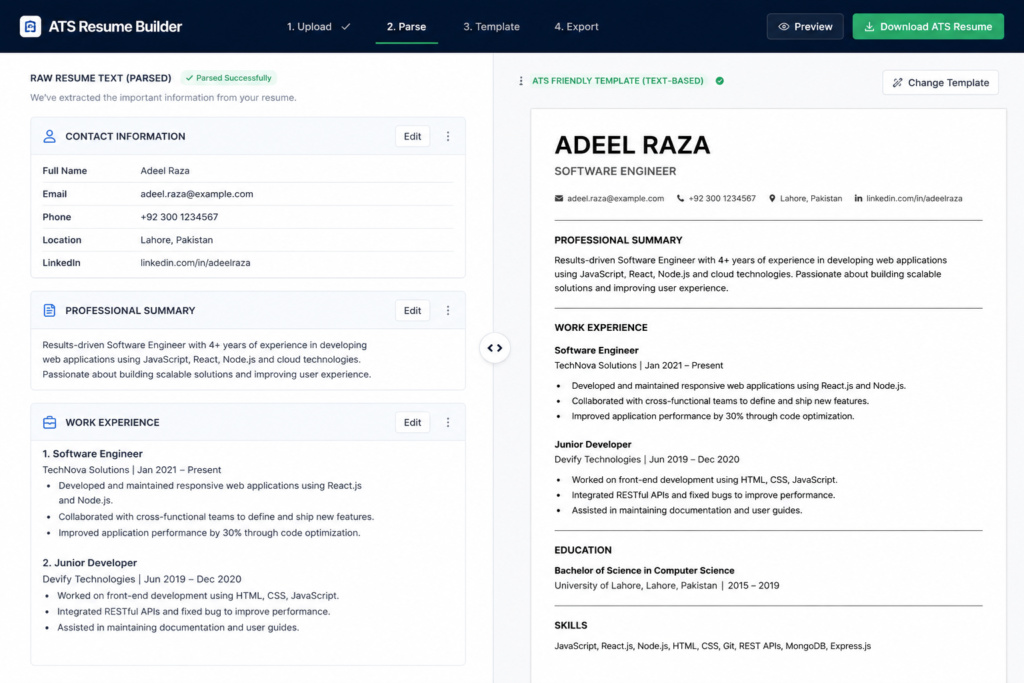
An ATS resume builder is a software tool designed to format and structure your resume so that applicant tracking systems can parse every field correctly—contact info, job titles, dates, and skills—while also matching keywords from a target job description.
An ATS resume builder is a tool designed to format and structure a resume so applicant tracking systems can parse every field correctly — contact info, job titles, dates, and skills — while also matching keywords from a target job description.
Most builders do one of two things: they generate a new resume from scratch with a single‑column, text‑based layout, or they scan and score an existing resume against a specific job posting. The best ats resume builder for you depends on which approach fits your workflow.
The Real Problem: Design vs. Content
Let’s get the most overlooked distinction out of the way. A resume can look beautiful in PDF, pass a free “ATS‑friendly” template check, and still fail in Workday. Why? Because ATS vendors—Oracle Taleo, Workday, Greenhouse, iCIMS—parse documents differently. A resume that parses cleanly in Greenhouse can drop your phone number in Taleo.
That’s why the originality angle of this guide is: separate “parsability” (design) from “relevance” (keywords). Most guides treat them as one problem. They aren’t.
- Parsability depends on font, columns, headers, tables, text boxes, and file format.
- Relevance depends on matching nouns, verbs, and phrases from the job description.
A builder like Rezi focuses on building from scratch with a clean layout and real‑time keyword scoring. A checker like Jobscan tests your existing resume against a specific named ATS and gives a parse report plus a keyword match score. You might need both.
Users who’ve tried a generic “ATS resume template” from a word processor often find it still fails because they used a two‑column layout. The scanner reads left‑to‑right, jumbling the second column’s text into the first, and the output becomes unreadable gibberish. That’s a design problem.
Meanwhile, someone who runs a perfectly formatted resume through a basic keyword checker might score 80% on match, but that checker only looks at single words—not multi‑word phrases like “project management agile” or “SQL database migration.” That’s a content problem.
What most guides skip is that you can solve both by using a builder that lets you upload the job description, then suggests which exact phrases to embed in the context of a clean, single‑column layout. That two‑step process is what separates the tools that work from those that just look “nice.”
Want to explore more AI-powered options? Read our complete guide to AI resume builders to compare the top tools, features, pricing, and ATS capabilities.
Top ATS Resume Builders Compared
We evaluated the leading tools based on three real‑world criteria: parse accuracy across multiple vendor systems, keyword optimization depth, and workflow friction. Here’s how the top three stack up.
Jobscan – Best for Testing Existing Resumes
Jobscan works as a checker layered on any resume you already have. You paste your resume text and the job description, and it returns a match score broken down by hard skills, soft skills, and keywords. Its standout feature: you can select the specific ATS (Workday, Taleo, Greenhouse, etc.) and it will show you a parse preview—exactly how that system will read your file.
- Best for: job seekers who already have a solid resume and want to optimize it for a specific application.
- Key benefit: tests against named ATS platforms, not generic “safe” rules.
- Limitation: does not help you build a new resume from scratch; you need a separate tool or template.
Rezi – Best for Building From Scratch
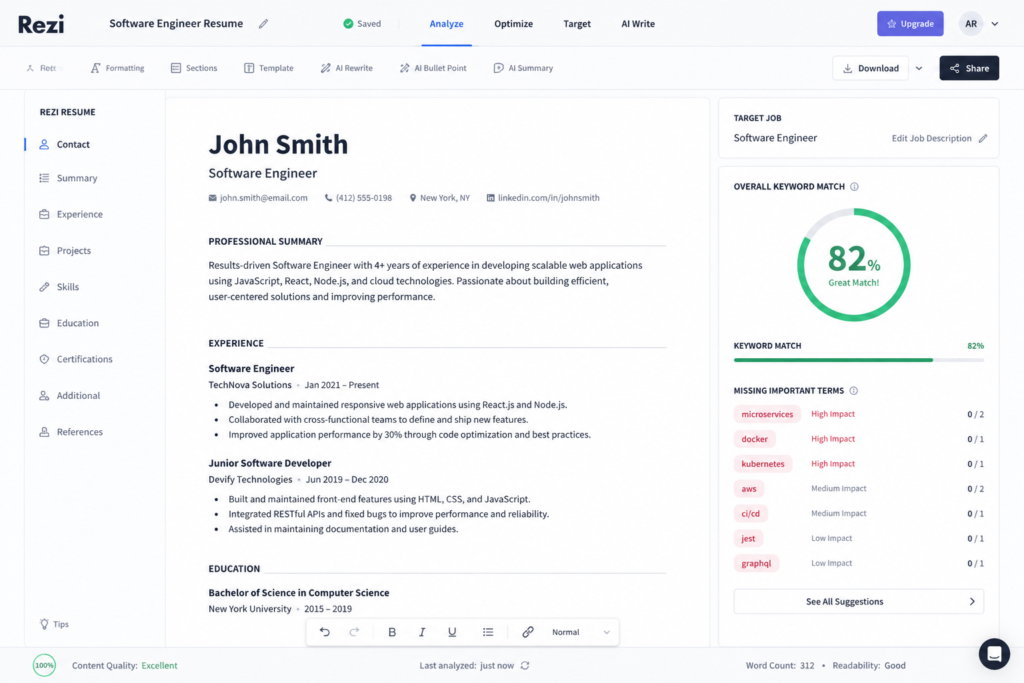
Rezi is a full‑fledged builder that guides you through each section with AI‑powered phrasing suggestions. It checks your resume against a job description in real time and highlights missing keywords. Its layout engine produces a single‑column PDF that passes most parsers.
- Best for: career changers or recent grads who need to build a fresh, ATS‑optimized resume without design guesswork.
- Key benefit: scores keywords as you type, so you don’t have to run a separate check.
- Limitation: its default settings are optimized for general corporate roles; niche industries (e.g., design, academia) may need customization.
Teal – Best for Job‑Specific Tailoring
Teal offers a hybrid approach: you can import an existing resume or start fresh, but its real strength is its “job tracker” that lets you create multiple versions of your resume, each tailored to a specific job listing. It suggests which skills to highlight per role and automatically adjusts your summary and bullet points.
- Best for: active job seekers applying to multiple roles simultaneously.
- Key benefit: manages multiple targeted resumes in one dashboard.
- Limitation: the free version limits the number of active job trackers.
Quick Comparison Table
| Option | Best For | Key Benefit | Limitation |
| Jobscan | Testing an existing resume against a specific named ATS | Parse preview per vendor + match score | No built‑in resume editor |
| Rezi | Building a new resume from scratch with real‑time scoring | Keyword suggestions as you write | Default output is generic; needs customization for non‑corporate fields |
| Teal | Managing multiple tailored versions for different jobs | Central dashboard with per‑job versions | Free plan limits active trackers |
For a deeper look, check out our comparison of AI resume builders (if available). But for most corporate applicants, the best approach is to use Rezi to build a clean base, then run each final version through Jobscan against the target company’s ATS.
Want to compare AI-powered resume tools? Read our complete guide to AI resume builders to compare their features, ATS optimization capabilities, pricing, and overall value.
How to Use an ATS Resume Builder (Step‑by‑Step)
To build an ATS‑friendly resume, follow these steps:
- Start with a single‑column, standard section layout—no columns, text boxes, graphics, or tables.
- Use standard header labels: “Work Experience,” “Education,” “Skills,” “Certifications.”
- Mirror exact keywords from the job posting—include both single terms and phrases (e.g., “budget forecasting” not just “forecasting”).
- Export as a text‑based PDF—not an image‑based or design‑heavy PDF.
- Test the parsed output using a tool that simulates your target ATS before submitting.
Many resume builder for applicant tracking systems tools automate steps 1–4. But step 5 is where most people stop too soon. You can use Jobscan’s free preview (limited scans) or a dedicated ats resume checker free like SkillSyncer’s basic scanner. Don’t rely solely on the builder’s built‑in score—test the actual parsed text.
Want to check your resume before applying? Discover more about ATS resume checker free tools to identify formatting issues, missing keywords, and other problems that could affect your ATS score.
Practical Test: Your Resume’s ATS Readiness
You’ve built or tweaked your resume. Now run this simple test:
- Parse test: Copy the text from your exported PDF and paste it into a plain text editor. Is everything in the right order? No missing fields? That’s what the ATS sees.
- Keyword coverage test: Highlight every noun and verb phrase from the job description. Count how many appear verbatim in your resume. Aim for >70% coverage for hard skills.
I’ve seen conflicting data—some sources say you need 80% match, others say 60% is enough. The most defensible read is that it depends on the employer’s threshold, which varies. So aim for as high as possible, especially for the first three “must‑have” skills listed.
What about ATS resume templates? They’re a great starting point, but they don’t solve the keyword problem. You still need to tailor content to each job. A templated layout is like a clean canvas—you still have to paint the right picture.
Need a cleaner starting point? See our breakdown of ATS resume templates to find resume formats designed for better parsing, readability, and compatibility with applicant tracking systems.
Common Mistakes That Trigger Auto‑Rejection
Even with a good builder, job seekers repeatedly make these errors:
- Using columns or tables — some ATS parse left‑to‑right and scramble second‑column content.
- Inserting graphics, icons, or logos — these become unreadable characters or break the parser.
- Submitting a PDF that is actually an image — if you can’t select text, the ATS can’t read it.
- Not updating the “Skills” section for each job — generic lists hurt your match score.
- Including “References available upon request” — wastes space and adds no parseable value.
The one step most guides skip: test your resume against the specific ATS the company uses. Jobscan’s paid plan lets you select the vendor; if you’re interviewing at a company known to use Workday (many large corporations), run a Workday‑specific preview.
Q&A – Voice Search Quick Answers
Q: What makes a resume ATS‑friendly?
A: Clean single‑column formatting, standard headers, and keywords that mirror the job description.
Q: How do I check my resume’s ATS score?
A: Run it through a dedicated ATS checker tool that tests against named systems like Workday or Greenhouse.
Q: Do tables and columns really break ATS parsing?
A: Yes — many ATS platforms read left‑to‑right and can scramble or drop content placed in columns or text boxes.
Q: Should I use the same resume for every ATS?
A: No — tailor keywords per job posting, since match scoring is specific to each job description.
Q: Is a PDF safe for ATS submission?
A: Yes, if it’s a text‑based PDF; image‑based or design‑heavy PDFs often fail to parse correctly.
Your Next Move: Test, Don’t Guess
An ATS resume builder is a powerful tool, but it’s only as good as your testing discipline. The best [ats optimized resume builder in 2026 is the one that lets you validate parse results against your target employer’s system—not just the one with the prettiest templates.
If you’re applying to Fortune 500 companies, prioritize a builder that offers named‑vendor testing. If you’re a startup or mid‑size applicant, a general builder like Rezi with real‑time keyword scoring will likely suffice.
One counterintuitive insight: Over‑optimizing keywords can backfire. Some ATS penalize “keyword stuffing” by flagging the resume as spam. Use terms naturally in context, not as a comma‑separated list at the bottom.
This works best for corporate and technical roles where ATS use is standard. It won’t apply if you’re applying to small businesses or creative agencies that review resumes manually—they may actually prefer a visually distinctive design. But for the vast majority of online applications, the ATS is the gatekeeper.
Now, take one of your current resumes, run it through a free parser preview, and see what the robot actually reads. That’s the first step to getting your application in front of a human.