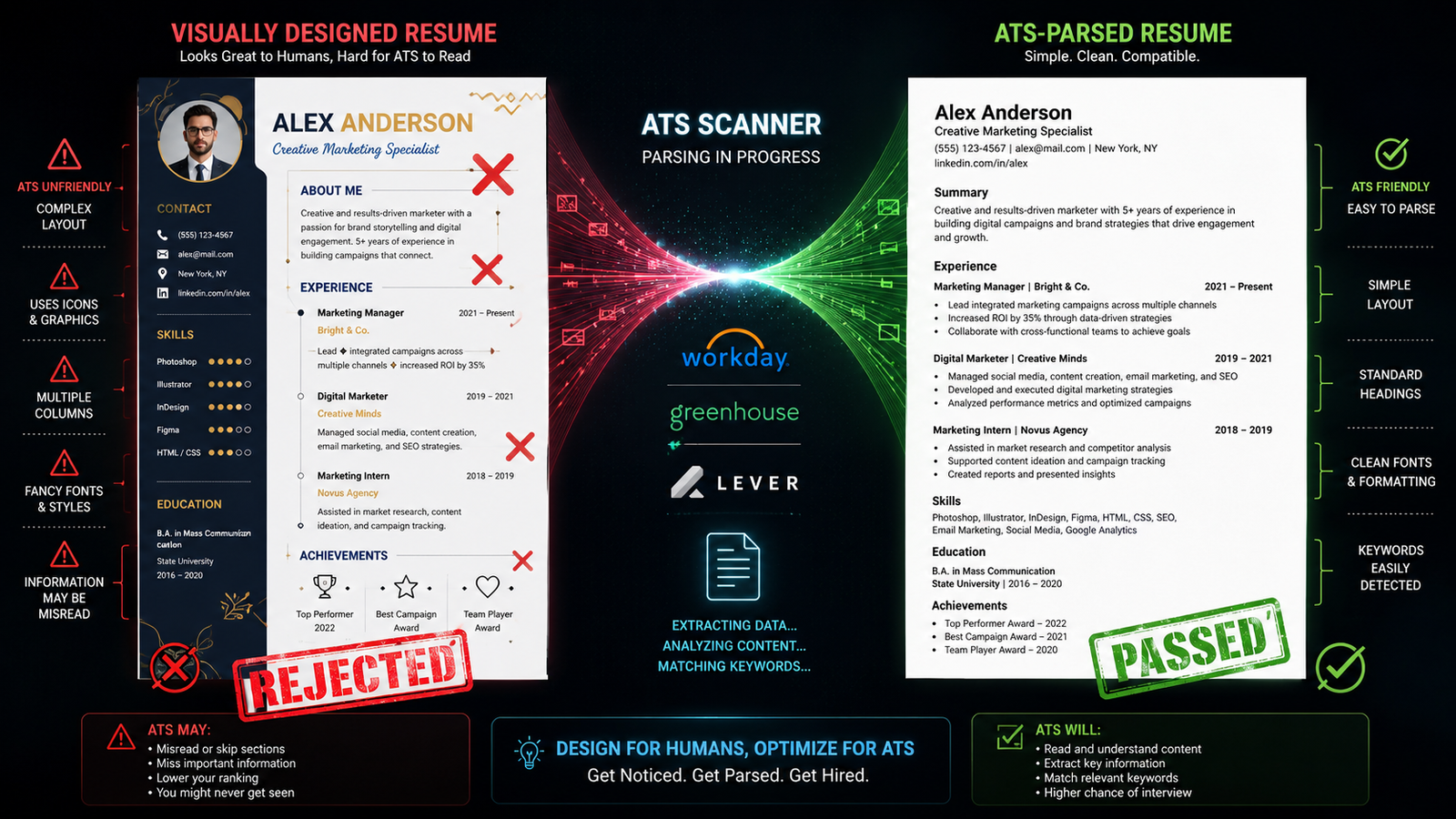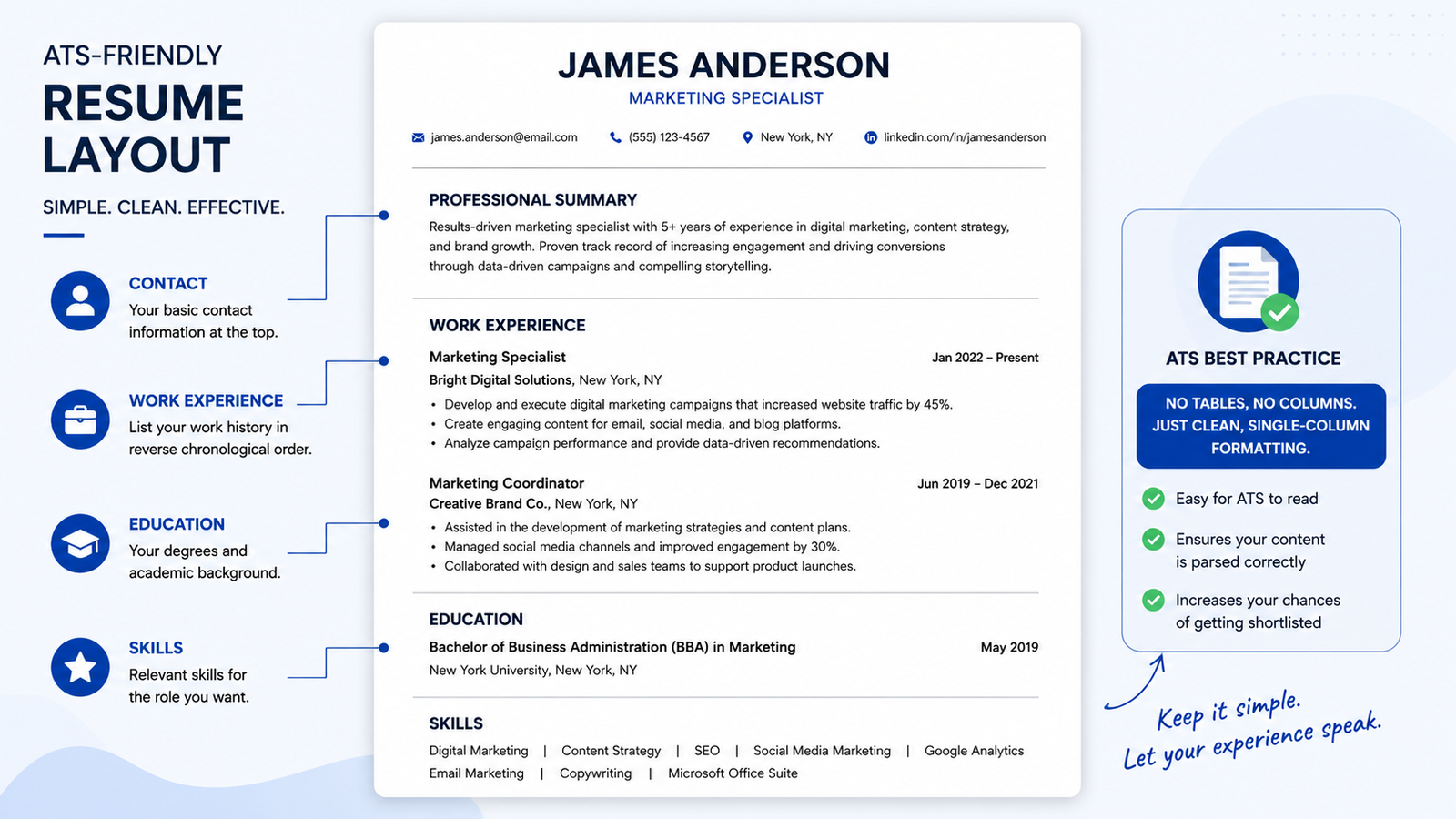
An ATS-friendly resume uses single-column layout, standard section headers, and job-specific keywords so applicant tracking software can correctly extract and score every field, from contact details to work history. That’s the short version. The longer version — the one most guides skip — is why those rules exist, and that’s where formatting advice actually gets useful.
This guide covers the formatting and parsing mechanics behind ATS compatibility: layout, headers, keywords, and file type. It does not address resume content strategy, cover letter writing, or the specific quirks of individual platforms like Workday or Taleo — those deserve their own breakdown.
Why ATS Parsing Breaks: The Mechanics Behind the Rules
Most job seekers treat ATS formatting rules like folklore. Avoid tables. Avoid columns. Nobody explains what’s actually happening under the hood, so the rules feel arbitrary — and arbitrary rules get ignored.
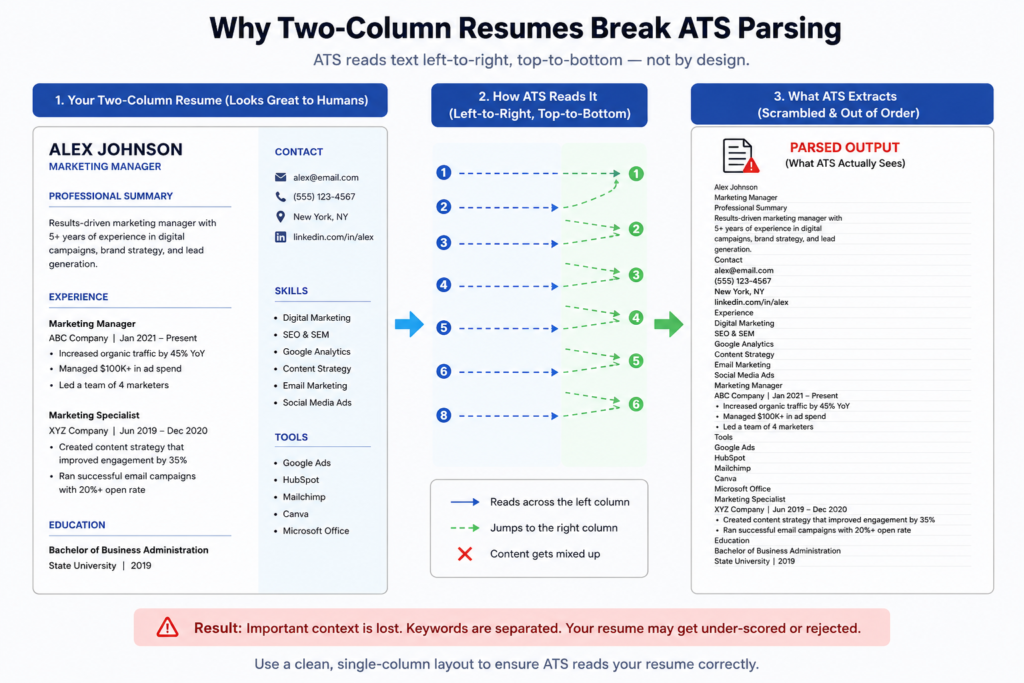
Here’s the mechanism. An applicant tracking system doesn’t “see” a resume the way a human does. It runs a parser that converts your document into plain text, then maps chunks of that text into fields: name, employer, dates, job title. Most parsers read left to right, top to bottom, treating the page as one continuous stream. A single-column resume format matches that stream perfectly.
A two-column layout doesn’t. When the parser hits a page split into a left sidebar and a right main body, it often reads straight across both columns as if they were one sentence — merging your “Skills” list with the first line of your job description, or scrambling dates into the wrong job entirely. This isn’t a rare glitch. It’s the default behavior of how left-to-right parsing engines process a page, and it’s the single biggest reason formatted resumes fail silently, with the applicant never knowing why.
What most guides skip is this: formatting for ATS doesn’t guarantee a human recruiter ever opens your resume. Passing the parser gets you into the system correctly. It doesn’t rank you, and it doesn’t replace a resume that reads well once a person looks at it. Those are two different jobs, and confusing them is how people over-optimize for machines and end up with a resume nobody enjoys reading.
Formatting is necessary. It’s not sufficient.
Formatting Rules That Actually Matter
To create an ATS-friendly resume, follow these steps:
- Use one column, no tables.
- Label sections with standard headers.
- Mirror exact keywords from the posting.
- Save as a text-based PDF.
- Avoid headers/footers for key info.
That’s the compressed version. A few of these deserve unpacking, since they’re where most resume formatting mistakes actually happen.
Standard headers matter more than people assume. ATS platforms are typically built against a known label set — “Work Experience,” “Education,” “Skills” — and they match your section titles against that list to know what kind of data follows. Rename “Work Experience” to something clever like “My Journey” or “Where I’ve Made an Impact,” and you risk the parser failing to classify that section at all. The content might be perfect. It just never gets read as work experience.
Keyword mirroring works the same way, but it’s easy to overdo. Readers in this situation typically pull five or six terms from a job posting and sprinkle them everywhere, assuming more is better. It usually isn’t — some scoring systems flag unnatural repetition, and a human reviewer who sees the same phrase four times in one page notices. Use each relevant keyword once or twice, in context, and let the rest of your resume speak normally. Underline the exact match logic if you’re unsure — a term like “Python” and “Python programming” may not be treated as identical by every parser.
I’ve seen conflicting data on how strict this matching actually is. Some sources claim modern ATS platforms use fuzzy matching that catches close variants. Others report exact-match failures even for minor phrasing differences. The most defensible read: mirror the posting’s exact wording wherever it’s true to your experience, and don’t assume the system will do the translating for you.
Check out our guide on how to test your formatting with a free ATS score checker before submitting your resume, so you can catch parsing and formatting issues that could hurt your ATS score.
Check out our guide on how to test your formatting with a free ATS score checker before you submit anything — catching a parsing error before you apply beats finding out after three weeks of silence.
Single-Column vs. Two-Column Resumes
Quick Comparison
| Option | Best For | Key Benefit | Limitation |
| Single-column layout | Online applications through an ATS | Reliable, linear parsing | Less visually distinctive |
| Two-column layout | Networking handouts, direct human review | Stronger visual design | High risk of scrambled fields in ATS |
| Hybrid (single-column, minimal design elements) | Roles reviewed by both software and people | Balances safety with some visual appeal | Requires more careful formatting discipline |
Single-column resumes work better for ATS parsing because most systems read left-to-right, top-to-bottom, and a single stream of content matches that reading pattern. Two-column resumes are stronger only for direct human review, such as networking handouts, printed leave-behinds, or portfolio-style documents nobody’s scanning by machine. The key difference isn’t which one looks better. It’s parsing reliability versus visual design, and those two goals pull in opposite directions.
Here’s the pushback I’d expect: some career coaches now argue that major platforms like Workday and Greenhouse have improved column parsing enough that this rule is outdated. There’s some truth to that for large, well-funded ATS deployments. But mid-market and legacy systems — which still cover a meaningful share of hiring — haven’t caught up at the same pace, and you rarely know which system a given employer runs. Defaulting to single-column costs you almost nothing in most industries. Betting on modern parsing when you’re not sure which system you’re facing costs you the interview.
Headers, Keywords, and File Format ATS Software Can Actually Read
Three smaller decisions round out an ATS-compatible resume layout: header labels, file type, and where key information physically sits on the page.
Use recognizable section headers. Stick to “Work Experience,” “Professional Experience,” “Education,” “Skills,” and “Certifications.” These match against ATS label libraries far more reliably than creative alternatives.
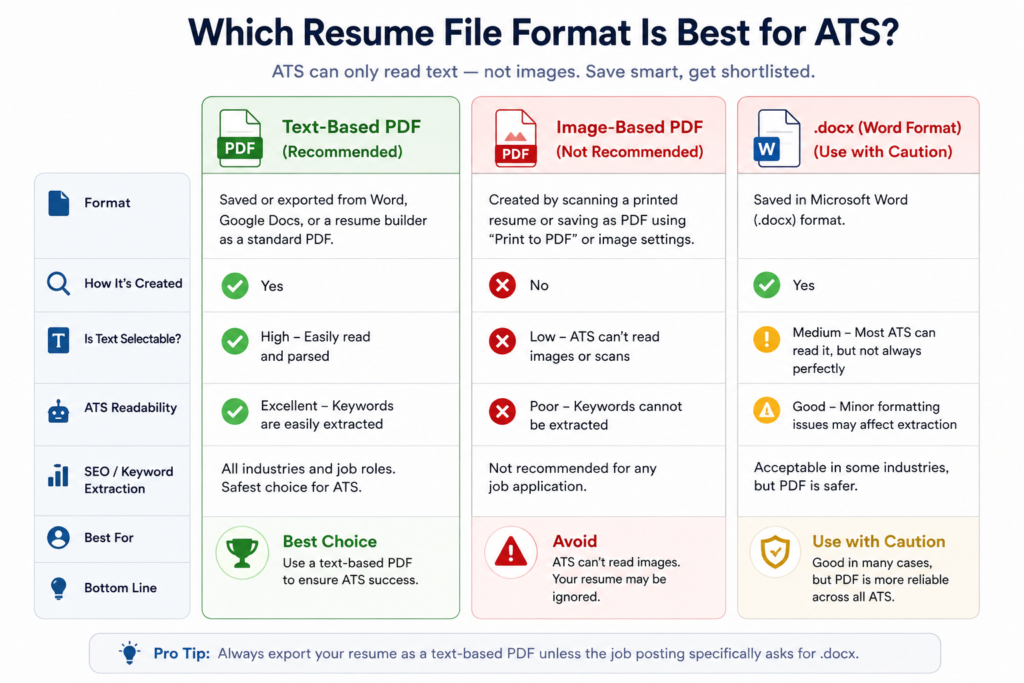
Save as a text-based PDF, not a flattened image. A text-based PDF preserves selectable, extractable text. An image-based export — common when a resume is designed in a tool like Canva and exported carelessly — turns your entire resume into a picture. No parser can read a picture. Word documents (.docx) generally parse fine too, though PDF has become the safer default across most 2026 hiring platforms.
Keep contact info and job titles in the document body, not headers or footers. Many parsers skip header and footer regions entirely, treating them as page furniture rather than content. A phone number sitting only in the footer sometimes never makes it into the candidate record at all.
An AI-friendly resume format follows nearly identical logic to ATS formatting, since many newer AI-driven screening layers sit on top of the same parsed text output rather than reading the original file directly. Get the parsing layer right, and you’ve largely handled both.
Read our complete guide to AI-friendly resume format to learn how to structure your resume for reliable ATS and AI-based screening.
Read our complete guide to AI-friendly resume formatting for the parts that go beyond classic ATS rules, including how generative screening tools summarize candidate profiles.
According to 2026 hiring-technology reporting, over 98% of Fortune 500 companies use some form of ATS, which makes ATS-safe formatting close to a universal requirement rather than a niche concern for tech-industry applicants only.
Jobscan — What Is an Applicant Tracking System? The Complete 2026 Guide
Research from Harvard Business School’s Managing the Future of Work initiative (2021) found that ATS filtering contributes to a substantial pool of qualified candidates — termed “hidden workers” — being screened out before a human ever reviews their application, often due to rigid keyword or formatting mismatches rather than any real skills gap.
If you want the link to appear naturally in the article, I’d use anchor text such as “Harvard Business School’s Hidden Workers research” rather than linking the entire statistic.
Quick Answers Before You Format Your Resume
Q: What’s the best resume format for ATS?
A: A single-column, reverse-chronological format with standard section headers and no tables or graphics.
Q: Why do two-column resumes fail ATS scans?
A: Many ATS platforms read left-to-right across the whole page, which can merge or scramble content from side-by-side columns.
Q: Can I use icons or graphics on an ATS resume?
A: Avoid them — most ATS software can’t parse embedded images or icons, and the associated text may be lost entirely.
Q: Should I use a creative section header like “My Journey”?
A: No — stick to standard labels like “Work Experience,” which ATS software is built to recognize.
Q: Is Word or PDF better for ATS?
A: A text-based PDF is generally safest, as long as it isn’t exported as a flattened image.
A Quick ATS Resume Checklist Before You Apply
Run through this before hitting submit:
- Single-column layout, no tables or text boxes
- Standard section headers only
- Keywords mirrored naturally from the job posting, not stuffed
- Saved as a text-based PDF (or clean .docx)
- Contact info and job titles in the body, not headers/footers
- File name includes your actual name, not “Resume_Final_v3”
None of these steps take long individually. Together, they’re the difference between a resume that reaches a human and one that quietly disappears into a database nobody opens.
If you’d rather compare tools that automate this checking process instead of doing it manually, the best AI resume builder comparison on this site walks through which platforms actually catch formatting errors before you submit.
Explore the best AI resume builder comparison to find the right tool for creating a resume that is both recruiter-friendly and optimized for modern AI screening systems.