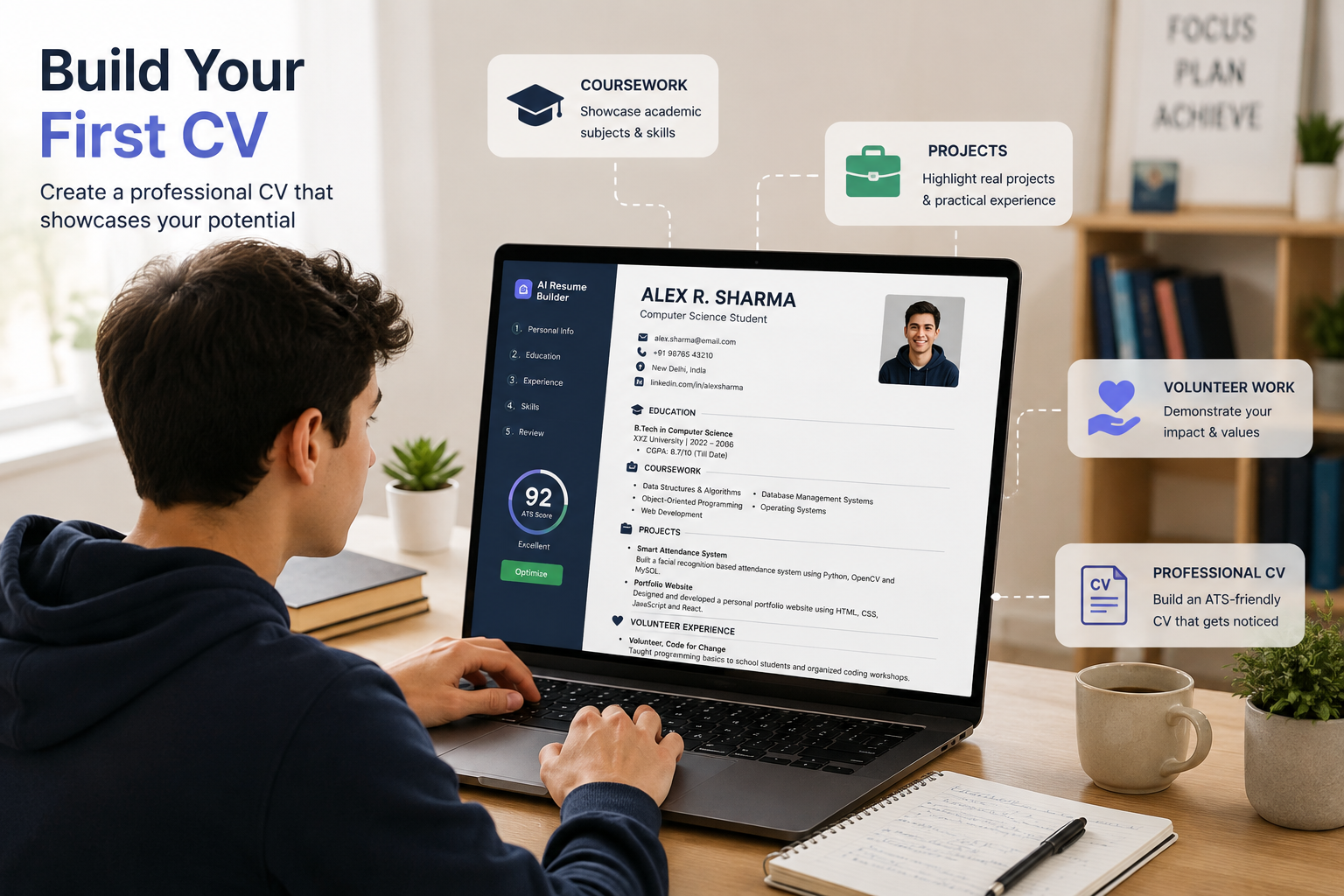
best ai cv maker for students is an AI CV maker for students that generates professional-sounding CV content from limited experience — coursework, class projects, part-time jobs, and volunteer work — while formatting it to pass automated screening.
Most “best resume builder” roundups assume you have work history to draw bullet points from. That’s not your situation. You’re a student or recent graduate with coursework, group projects, volunteer stints, and maybe a summer internship. The CV feels empty because you’re trying to fill it like someone with five years of experience. Wrong approach.
This guide covers AI CV builders that actually help you generate content from what you do have. It does NOT address executive-level CVs, academic CVs for tenure-track positions, or tools that require prior professional experience to function.
Why Generic CV Templates Fail Students (And What Actually Works)
Canva templates are everywhere. Word’s built-in templates are on every laptop. Copying a friend’s CV structure takes five minutes. Yet students who use these approaches consistently report the same outcome: they stare at a blinking cursor, delete and retype the same weak bullet points, and end up with a document that feels forced. The problem isn’t you. It’s the tool.
Generic templates expect you to already know how to phrase achievements. They offer zero guidance on what to write. They don’t know that a capstone project can be framed as a deliverable, or that leading a student organisation counts as management experience.
AI CV builders solve a different problem. They don’t just format your text — they help you generate it. You feed in raw information about what you did, and the AI suggests professional-sounding bullet points, action verbs, and achievement-oriented phrasing.
What most guides skip is this: the quality of AI output depends entirely on what you input. Feed it “I was in a group project for my marketing class” and you’ll get generic filler. Feed it specifics — “Led a 4-person team to develop a go-to-market strategy for a fictional product, presented to 3 industry judges” — and the AI can actually produce something useful.
Quick Comparison: Top AI CV Makers for Students in 2026
| Option | Best For | Key Benefit | Limitation |
| Kickresume | Students wanting unlimited free downloads | 4 free templates, no watermark, GPT-4.1 AI writer | AI writer and ATS checker locked behind paywall |
| Novoresume | One-page student CVs with design polish | Free tier genuinely usable for single-page PDF | One-page limit; no Word export |
| Teal | Students applying to multiple internships | Unlimited free resumes + job tracker | AI output can feel generic |
| Canva | Creative field applications | Free PDF export, no watermark, unmatched design control | Design-first, not ATS-first; basic AI tools |
| Rezi | ATS-optimised entry-level CVs | Built for entry-level; 23-factor ATS scoring | Templates are functional, not visually striking |
How AI CV Builders Actually Work (And What They Can’t Do)
An AI CV builder uses large language models — similar to what powers ChatGPT — to turn your raw information into professional bullet points. You provide details about your education, projects, skills, and any experience. The AI suggests phrasing, action verbs, and structure.
Here’s what they can do:
- Suggest 5–10 different ways to phrase a single bullet point
- Identify weak phrasing and offer stronger alternatives
- Format everything to ATS standards automatically
- Generate cover letters that match your CV’s stylex
Here’s what they cannot do:
- Invent experience you don’t have (and you shouldn’t ask them to)
- Guarantee you’ll get an interview
- Replace the need to tailor your CV to each job
Want to understand what happens after you submit your CV? Learn more about how ATS scanning works before you even apply and how applicant tracking systems evaluate your resume.
The Real Problem: Writing a CV With No Work Experience
Students with no formal work history can still build a strong AI-generated CV by feeding coursework and volunteer experience into the tool. Free-tier tools like Novoresume are frequently ranked among the most generous for exactly this use case in 2026 comparisons.
To build a strong first CV with AI, follow these steps:
- List every project, class, and volunteer role you’ve been part of in the last 2–3 years — include specifics like team size, tools used, and outcomes.
- Let the AI reframe them as achievements by feeding those specifics into the builder’s AI writer.
- Add a skills section with tools, software, and languages you’ve actually used.
- Keep formatting to one column — two-column designs confuse ATS software.
- Tailor it per internship or job posting using the builder’s job-matching features if available.
Need more than a strong CV? Read our complete guide to write a cover letter to go with your first CV and learn how to create a cover letter that complements your application and highlights your strengths.
The best CV maker for graduates prioritises ATS-safe formatting over decorative design, since most graduate-scheme applications route through the same automated screening as experienced-hire roles.
Tool-by-Tool Breakdown: Which One Fits Your Situation
Kickresume: Best Free Overall for Students
Kickresume serves over 8 million job seekers worldwide and holds a 4.6/5 Trustpilot rating from roughly 3,585 reviews. The free tier gives you 4 basic resume templates, 4 matching cover letter templates, access to 20,000+ pre-written phrases and 1,500+ resume examples, and — critically — unlimited downloads with no watermark.
The AI writer runs on GPT-4.1 and can generate job-specific bullet points and summaries based on the role you’re targeting. For students, Kickresume occasionally offers a 6-month free Premium offer that is “probably the best student deal in the resume builder space.“
- Best for: Students who want unlimited free CV exports and AI writing help without committing to a subscription.
- Watch out for: The AI writer and ATS checker are locked behind the paywall. The free tier is essentially a template builder with phrase suggestions — not full AI generation.
Novoresume: Best for a Polished One-Page Student CV
Novoresume has helped over 18 million users land jobs at companies like Google, Amazon, and Tesla. Its free Basic plan lets you build and download one resume as a PDF, limited to a single page, with a small set of templates, three fonts, and 30 colour themes.
The platform’s templates are tested to pass 99% of applicant tracking systems while maintaining clean, modern aesthetics. The guided editor provides smart content suggestions as you fill out experience, skills, and summary fields.
- Best for: Students who need one strong, design-forward CV for a specific application and don’t need multiple versions.
- Watch out for: The one-page limit becomes a real constraint if you have more than a page’s worth of content. Premium plans start around €11.67–€19.99 per month depending on billing cycle.
Teal: Best for Students Applying to Multiple Internships`
Teal’s free plan offers unlimited resume versions with no cap — genuinely generous for students applying to dozens of internships. The platform pairs resume building with a full job-application tracker, so you can manage your entire search in one place.
The Chrome extension holds a 4.9/5 rating from 3,200+ reviewers.
- Best for: Students running a high-volume internship search who need to tailor CVs for each application.
- Watch out for: Independent testing has flagged that Teal’s two-column templates can parse incorrectly in Workday-type ATS systems. The AI output is functional but some users find it generic and requiring heavy editing.
Canva: Only for Creative Fields
Canva’s free tier exports clean PDFs with no watermark, and the template variety is unmatched. For design, marketing, or creative roles where visual presentation matters, Canva is a legitimate option.
However, the Canva AI Resume Builder is best described as a “design-first resume tool with a few AI features added in” rather than a true AI-powered resume platform. The AI tools are fairly basic and don’t meaningfully improve or tailor your content.
- Best for: Students applying to creative roles where visual design is valued over ATS parsing.Watch out for: Many Canva templates are not ATS-friendly, and heavy use of design elements can actually hurt your chances of getting through screening systems.
Free Tier Reality Check: What “Free” Actually Means
According to 2026 resume-tool testing, free tiers vary widely in how much AI content generation they unlock. Students should compare free-tier limits before assuming any two “free” tools are equivalent.
| Tool | Free Download | Watermark? | AI Writer Free? | Export Format |
| Kickresume | Unlimited | No | No | |
| Novoresume | 1 resume | No (free tier has watermark on some reports) | Yes (basic suggestions) | PDF only |
| Teal | Unlimited | No | Limited | PDF, DOC |
| Canva | Unlimited | No | Yes (basic) | PDF, PNG, many others |
| Rezi | 1 resume | No | Yes |
Not sure which tool is worth using? Check out our guide on the best AI resume builders for students to compare features, free plans, AI capabilities, and ATS-friendly options.
Step-by-Step: Building Your First AI-Generated CV
Step 1: Gather Your Raw Material
Before you open any tool, make a list of everything you’ve done in the last 2–3 years:
- Coursework: Any class with a major project, thesis, or presentation
- Group projects: Team size, your role, tools used, outcome
- Volunteer work: Organisation, duration, what you actually did
- Part-time jobs: Even retail or food service counts
- Student organisations: Leadership roles, events organised, members
- Skills: Software, languages, technical tools
Don’t judge whether something is “important enough.” List everything. The AI can help you decide what to keep.x
Step 2: Choose Your Tool Based on Your Situation
- One specific application → Novoresume or Rezi
- Mass internship applications → Teal or Kickresume
- Creative/design role → Canva
Step 3: Input Everything, Then Edit
Feed your raw list into the AI writer. Let it generate bullet points. Then edit:
- Remove anything that sounds exaggerated
- Add specifics the AI couldn’t know (exact numbers, tools, outcomes)
- Make sure it sounds like you, not a robot
Learn how to tailor a CV for each job application so your skills, coursework, and experience align more closely with the requirements of every role you apply for.
Step 4: Run the ATS Check
Most paid tiers include an ATS checker. If you’re on a free tier, use a free ATS scanner like Jobscan (five free scans), to verify your formatting won’t get rejected.
Step 5: Export and Apply
Export as PDF unless the application specifically asks for Word. Apply with confidence — you now have a CV that actually represents what you’ve accomplished.
Common Questions About AI CV Makers for Students
Q: What’s the best free CV maker for students?
A: Kickresume is frequently ranked for its generous free tier aimed at first-time job seekers.
Q: How do I write a CV with no work experience?
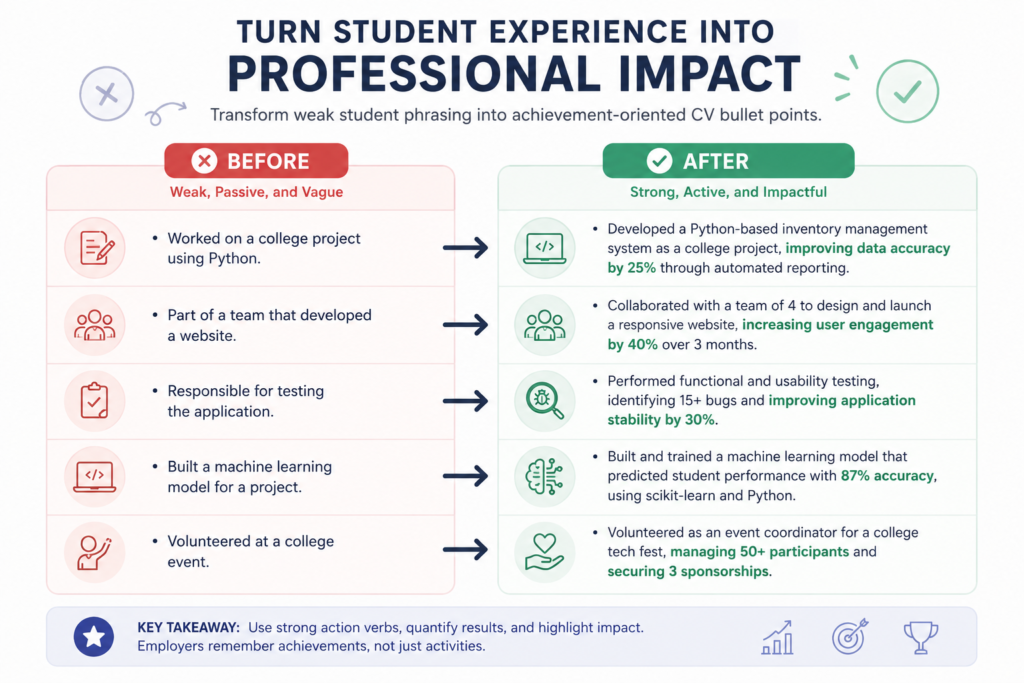
A: Reframe coursework, class projects, and volunteer roles as achievements with measurable outcomes.
Q: Should students use ATS-friendly formatting too?
A: Yes — graduate schemes and internships increasingly route through the same ATS software as experienced-hire roles.
Q: Can AI write a CV entirely from scratch?
A: It can draft content from the details you provide, but you still need to supply real projects and experiences for it to work with.
Q: Is a CV different from a resume?
A: In the US they’re often used interchangeably for job applications; a CV is typically longer and used more in academic or international contexts.
The One Thing Most Students Get Wrong
Students consistently overemphasise job titles and underemphasise outcomes. “Marketing Intern” tells a recruiter nothing. “Increased social media engagement by 25% through a targeted content campaign” tells them something.
AI CV builders are good at suggesting action verbs. They’re less good at knowing what outcomes you actually achieved. That part is on you.
I’ve seen conflicting data on whether ATS systems actually reject fancy formatting or if that’s overblown. Some sources say two-column designs are fine; others say they break in specific systems like Workday. The most defensible read is this: single-column, standard-section-heading resumes pass everything. Fancy designs pass some systems and break in others. Why take the risk?
Final Verdict: Which Should You Choose?
| Your Situation | Recommended Tool |
| You need one strong CV for a specific application | Novoresume |
| You’re applying to 20+ internships and need multiple versions | Teal or Kickresume |
| You’re in a creative field and design matters | Canva |
| You want ATS-optimised content with minimal effort | Rezi |
What This Guide Doesn’t Cover
This guide covers AI CV builders for students and recent graduates with limited or no work experience. It does NOT address:
- Executive-level CV writing
- Academic CVs for tenure-track faculty positions
- Tools that require prior professional experience to function
- Automated job application tools that submit applications for you
Conclusion
The best AI CV maker for students isn’t the one with the most features. It’s the one that actually helps you generate content from what you already have — coursework, projects, volunteer work, and part-time roles — and formats it so recruiters can actually read it.
Start with a free tier. Build one CV. See how the AI handles your raw material. Then decide if you need to upgrade for more templates, multiple versions, or ATS checking.
Your first CV doesn’t need to be perfect. It needs to be done. These tools help you get it done.
Ready to turn your CV into a stronger job-search tool? Learn how to build a CV that actually gets you interviews with practical strategies for highlighting your skills, experience, and achievements.


[…] production-ready web services from first principles. For aspiring tech professionals consulting Infolopia’s CV Maker for Students, Zain’s immersion illustrates that bridging the student-to-developer divide requires moving […]